SwordSearcher 5.3 out the door

SwordSearcher Bible Software version 5.3 is finally released. Yay!

In looking over the revision history, I think this is one of the most significant updates since 5.0 — not because of new content, but just because of new code. The new user editor should really be useful for people writing their own personal notes in the software, and the new Scan Text for Verse References tool should be an all-around time saver for anyone who reads Bible study stuff on the web.

Here’s what it does:
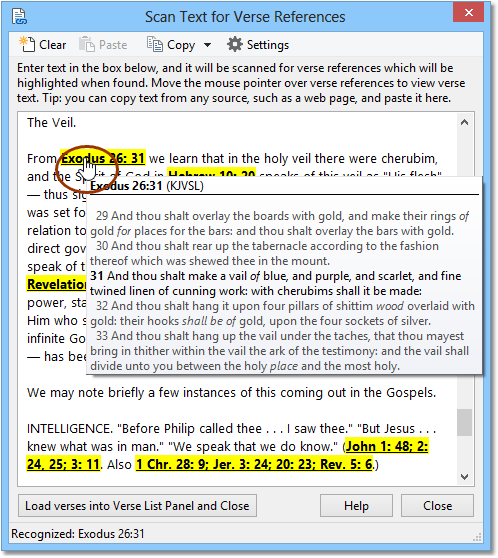
SwordSearcher Scan Text for Verse References tool

In the above example, I copied in text from a web page using the Windows clipboard. Each reference is automatically highlighted by SwordSearcher, and I can hold the mouse pointer over a reference to read the Bible text as I read along in the article. Obviously, clicking the verse links performs actions such as moving the Bible panel to the passage or loading the references in a Verse List panel.

This even works with “old style” commentaries that use Roman numerals for chapter identifiers.

(Geek alert: the rest of this blog post is programmer stuff.)

In order to handle this automatic verse reference discovery, I built a custom parser that uses a combination of Regular Expressions and good ‘ol Delphi code. SwordSearcher can understand over 2,000 forms of Bible book names and abbreviations. Jan Goyvaerts’ program RegEx Buddy was an invaluable aid in developing the RegExes SwordSearcher uses internally — I highly recommend it if you have to build RegExes in your line of work.

Anyway, version 5.3 was a lot of fun to develop. Now I can switch gears for a little while and do some other work that’s been waiting for me…

Web work can be fun; Forge update.

Web design can be fun… when you’re doing something new, making progress, and getting good results.

I spent the last couple of days re-designing the SwordSearcher website. It was overdue for an update — it still had a “2004” kind of feel to it. It was a nice change of pace from coding and doing Uncle Sam’s paperwork.

For the curious: I used Adobe Illustrator, Corel Paint Shop Pro, and Dreamweaver.

Another note: I updated Forge (a module build tool for SwordSearcher) to 2.0 earlier this week. It now automatically finds verse references for hyperlinking in the SwordSearcher display panels and the Verse Guide, so it’s no longer necessary to pre-tag verse references or rely on a third party program to do it. It even handles chapters written in roman numerals. The next update to SwordSearcher will incorporate the same verse parsing system for the in-program module editing features. Stay tuned…

My Mac Adventures: Addendum

As readers of this blog probably know, in 2005 I embarked on an ill-fated voyage to create a native Mac version of my Bible software. I was unable to complete my quest and disappointed several of my users who had already switched to Mac and were hoping I would be able to give them SwordSearcher on their own platform.

Well, nothing has changed with regard to development — I won’t be resuming work on the Mac version of SwordSearcher in the foreseeable future as all of the reasons I suspended work on that project still stand — but I received an email from a long-time SwordSearcher user who wanted to share his success at using SwordSearcher on his Mac with Crossover.  Here’s an excerpt:

“And I’m pleased to announce it WORKS! And it actually integrates so well, I wouldn’t even know I was using a mixed setup of Windows and Apple, they BOTH seem native mode in operation, and I use them at the same time.”

Complete details have been posted on the SwordSearcher Mac website.

Additional thought: do software compatibility layers like Crossover for Mac and WINE for Linux make native development irrelevant?

Well, certainly not irrelevant in every case.  But in my case, it certainly reduces the need to expend development energy targeting multiple platforms when Linux and Mac already have excellent “emulation” alternatives. (And yes, I know WINE is not an emulator!)  A single developer like myself, on a project as complex as SwordSearcher, is better off focusing on doing the best on Windows — where almost all the customers are — rather than trying to spend time writing multiple versions of the software, or worse, using cross-platform development tools that invariably result in a “lowest common denominator” feel for the application. And with WINE and Crossover Mac, a viable solution already exists that allows me to continue to focus my efforts on one platform.

Migrating a boot partition to a new drive in Windows

I installed a new hard drive on my wife’s machine because she kept running out of space. I didn’t have the time or inclination to do a new Windows XP install, and didn’t want to install the drive as a secondary because that means she would constantly have to redirect where stuff is installed, so I decided to transfer the old drive data to the new drive.

I got her a Western Digital drive, so I figured I’d try using their utility to do the transfer. The Western Digital Data Lifeguard boot CD-ROM utility failed to copy the old partition to the new drive with an unspecified error. (Come on! Cryptic errors are better than nothing!)

So I tried using the GParted LiveCD. It took a long time just to get something visible on the screen, mucking around in interactive boot mode. Finally, I got it to copy the partition to the new disc and resize it. Or so it told me. It took an hour but the target drive was not bootable. I checked all the partition flags and even booted the Windows install CD in recovery mode to rewrite the boot sector (FIXBOOT), and when that didn’t work, the MBR (FIXMBR) and boot sector. It just wouldn’t boot — and no error messages from the BIOS either (how nice).

Finally, I downloaded Acronis Migrate Easy 7.0.

This program is awesome. It is what all low level utilities should be. It just works. I was hesitant to try anything that didn’t run off a boot disc, assuming that I was asking for trouble running a program in Windows to copy the boot partition to a new drive. But it was easy and clear, and apparently Acronis really knows how to make Windows do low-level stuff the right way. It re-booted the system into the UI mode that I’ve only seen chkdsk run in and copied the partition to the new drive, then told me it was done and I could remove the old drive and reconfigure the system to boot from the new drive. And it just worked.

I copied a partition from an 80 gigabyte parallel ATA drive to a 250 gigabyte serial ATA (SATA) drive. The partition was automatically expanded to fill the new space, and I didn’t need to defrag afterwards even though the source drive was pretty fragmented — apparently it does more than just a blind copy of the clusters.

Anyway, this program is awesome and worked perfectly. I just wanted to sing its praises and hope this might help someone else avoid the hassle I went through learning about it.

SwordSearcher 5.2 Released

A new version of SwordSearcher Bible Software is now available: version 5.2.

As I mentioned before, this new version adds “words of Christ in red letters” for the KJV, and also gives the ability to restrict a Bible search to just the words of Christ. The Deluxe study library also adds the following modules:

  • Morrish Bible Dictionary
  • Calvin’s Commentaries
  • Sketches of Jewish Social Life and The Temple: Its Ministry and Services

See the revision history for a complete list of new features.